Calian | TW162 Smart GNSS Signal Splitter
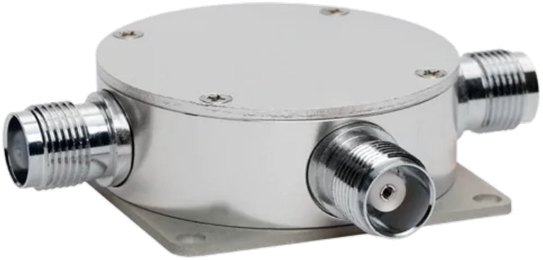
Smart 1-to-2 GNSS signal splitter for high-availability systems, letting two receivers share one antenna across the full GNSS spectrum.
Smart 1-to-2 GNSS signal splitter for high-availability systems, letting two receivers share one antenna across the full GNSS spectrum.
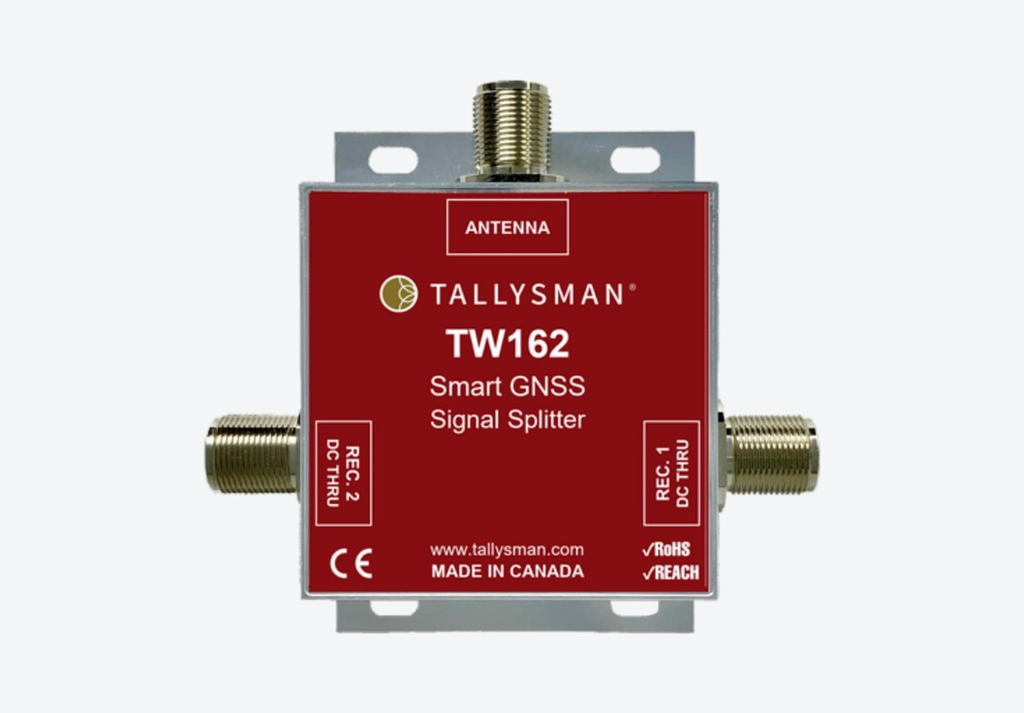
Smart 1-to-2 GNSS signal splitter for high-availability systems, letting two receivers share one antenna across the full GNSS spectrum.
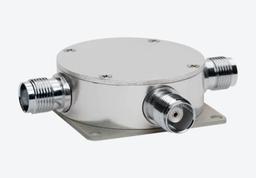
Calian TW162 Signal Splitter is a professional-grade 1-to-2 port GNSS signal splitter designed for critical applications requiring high availability. Supporting the full GNSS spectrum, it enables two receivers to share a single antenna, with automatic power switching to ensure continuous operation. TW162 sits in a rugged, IP67-compliant aluminum enclosure for GNSS signal distribution in challenging environments.
Allows two GNSS receivers to share a single antenna
Fits in-line with antenna cable
Rugged design
Suitable for harsh environment
Typical applications of the TW162 1-to-2 Port Smart Power GNSS Signal Splitter include:
Distributing one GNSS antenna feed to multiple receivers
GNSS test benches and laboratory setups
Timing rooms and reference station installations
Compensating cable loss in long antenna runs
Part Number: 32-0162-xx
Where xx=connector: 14 = type-N (female) | 01 = TNC (female)
Please refer to Tallysman's Ordering Guide to review available radomes and connectors at: https://www.tallysman.com/resource/tallysman-ordering-guide/
The TW162 1-to-2 Port Smart Power GNSS Signal Splitter is part of the GNSS Amplifiers & Signal Splitters range at Leo Drive. Browse all autonomous vehicle sensors and components, or talk to our engineering team about integration in your project.
Tell us about your platform and our engineers will propose the right setup and quote it.
 18 products
 10 products
 4 products
 10 products
 15 products
 16 products
 5 products
 5 products
 26 products
 6 products
 11 products
 5 products
 4 products
 31 products
 9 products
 7 products
 7 products
 9 products
 6 products
 1 product
 3 products
 3 products